Start Upload from Repository
Before you select files, you first need to start the upload from the repository. SliceVault supports two common entry points depending on whether you are creating a new patient record or adding data to an existing one.
Choose How to Start
Open the repository and use one of these options:
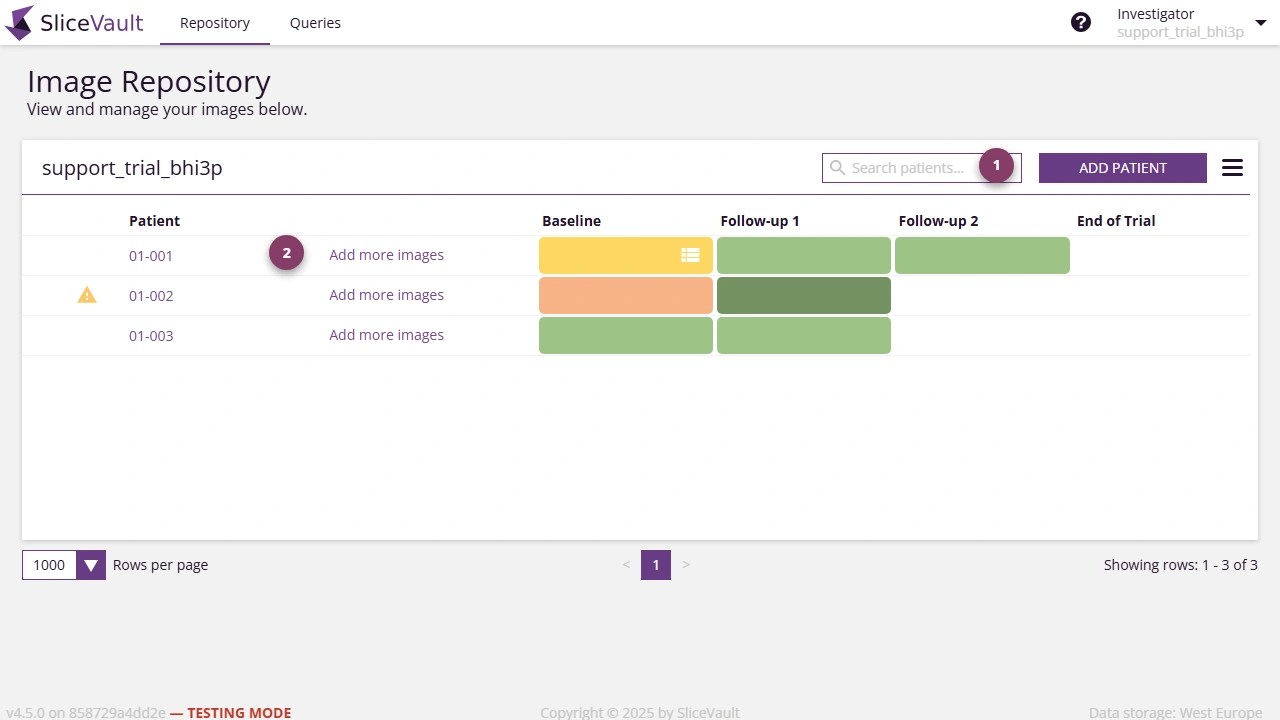
- Click Add Patient to upload data for a new patient.
- Click Add More Images next to an existing patient to upload more data to an open visit.
When Each Option Is Available
Use Add Patient when the patient has not yet been created in SliceVault.
Use Add More Images when:
- the patient already exists in the repository
- at least one visit is still open for more uploads
Troubleshooting
If the repository entry points are not available, continue to:
- Why Is Add Patient Disabled or Grayed Out?, if you cannot start upload from the repository
- Why Is Add More Images Missing?, if the patient exists but you cannot continue upload from that patient row
- Why Can’t I Select the Right Visit for Upload?, if you can start upload but the right visit is missing later in the upload flow
Continue the Upload
After starting the process, continue with Upload Images to select the visit, choose files, label series, and complete de-identification.