Review Forms and Documents
Monitors and Project Managers often need to verify what has already been submitted for a visit rather than upload new data. In SliceVault, that review usually happens from the Visit Dashboard.
Open the Visit Dashboard
From the repository, click the colored square for the patient and visit you want to inspect.
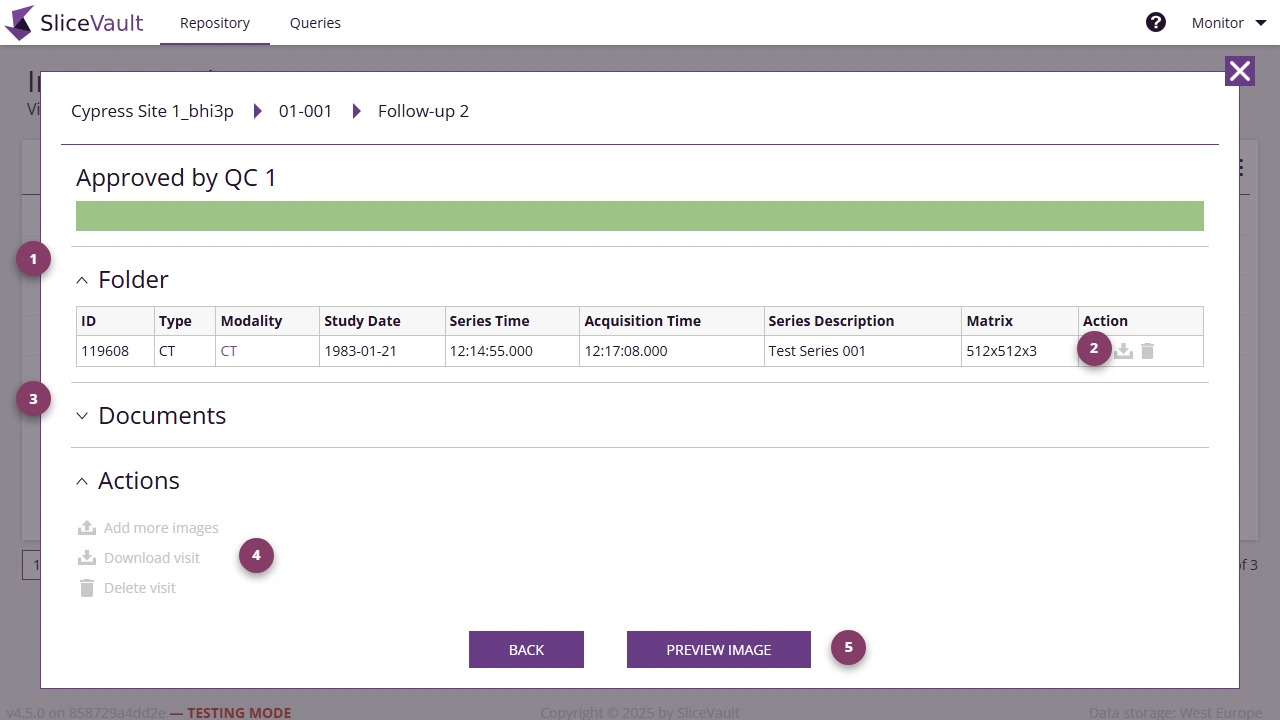
The Visit Dashboard is the main place to review:
- Uploaded image series in the Folder section.
- Individual image-level actions.
- Generated PDFs and completed records in the Documents section.
- Visit-level download options in the Actions section.
- Full image and form context through Preview Image.
Review Completed Forms
If the study includes forms for your role, or if you need to inspect forms completed by other users, click Preview Image to open the DICOM Viewer. This gives you access to the visit in context, including associated forms and images.
Review Documents
Use the Documents section to open or download visit-level PDFs and other generated outputs. This is useful when you need to confirm what has already been completed without changing the workflow status.
Download Data
If you need to export the visit or download individual files after approval by a Quality Control Manager, continue to Download Data.
If expected forms or documents are missing, see Why are forms or downloads still unavailable?.