Visit Dashboard Actions
After opening a visit from the repository, the Visit Dashboard becomes the main workspace for QC review. This is where you inspect uploaded data, open the viewer, review documents, and move the visit forward in the workflow.
Open the Dashboard
From the repository, click the yellow square in the repository for the visit that is pending your review.
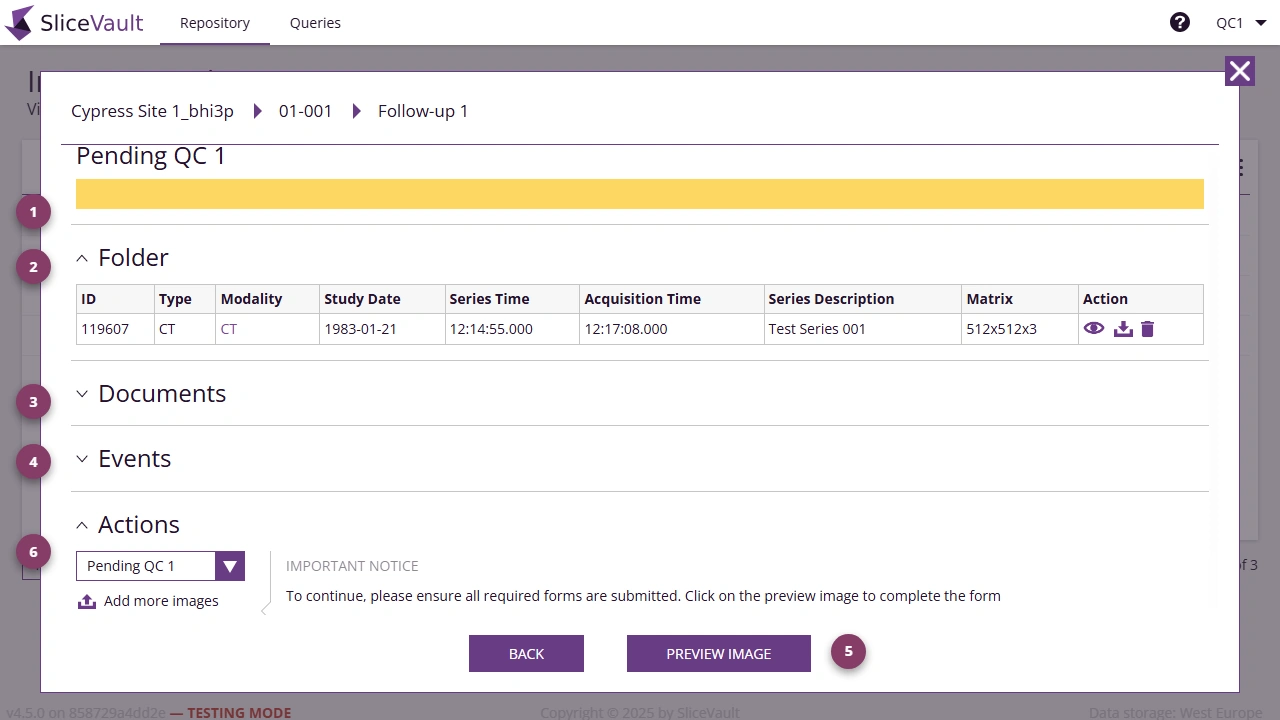
- Use 1 to review the current visit status.
- Use 2 to view uploaded images and related visit data.
- Use 3 to see any PDF records created during the workflow.
- Use 4 to review the main change events for this visit.
- Use 5 to open Preview Image so you can review images, access QC forms, and use the query tools.
- Use 6 to review the Actions section.
Typical QC Workflow from Here
From the Visit Dashboard you can continue to: