Invoicing and Visit Fees
SliceVault invoices visit fees based on submitted visits. This page explains when visit fees are assessed, how to reconcile invoice counts, and how to access the underlying visit list directly in SliceVault.
When is a visit fee assessed?
Visit fees are assessed at the time a visit is submitted in SliceVault. This means:
- Visits that are uploaded but not submitted are not counted toward visit fees.
- If a visit is created but never submitted, it will not be included in the invoice.
- Invoice counts can be reconciled by listing all submitted visits for the invoiced period.
This approach ensures that billed visits represent visits that have completed the site submission step and entered the study workflow.
How to view which visits were billed for a period
You can retrieve a detailed list of submitted visits using the KPI Dashboard pivot table.
Steps
- Open the KPI Dashboard
- Scroll to the pivot table section
- Select Advanced pivot table options
- Add the following fields to the pivot table:
- Select the Visit submission year that match the invoiced quarter (for example, 2025)
- Select the Visit submission month that match the invoiced quarter (for example, Sep, Oct and Dec)
- Select Center
- Select Patient ID
- Select Visit name
This will generate a row-level list of all visits submitted in the selected period. The total row count is the number of submitted visits included for that period.
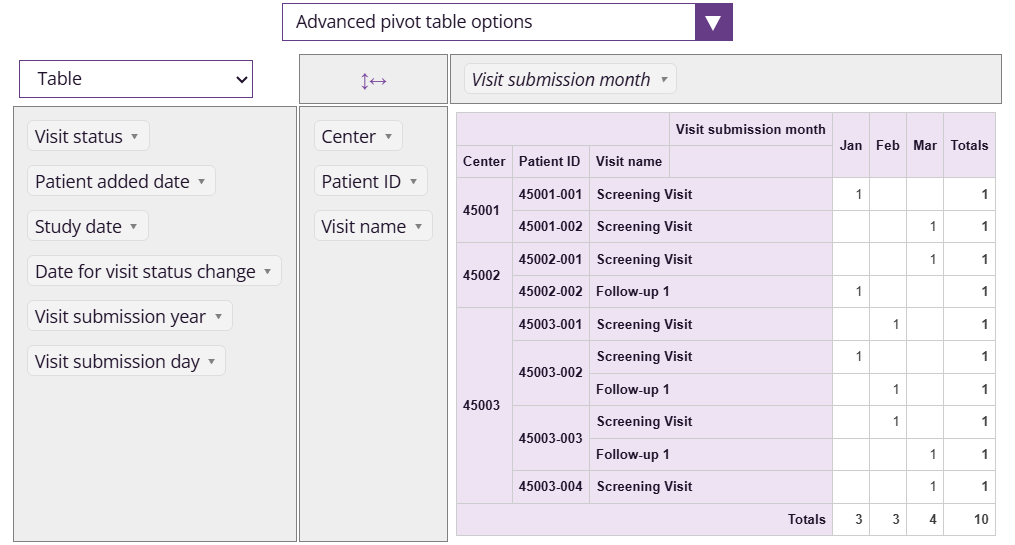
Note: The example screenshot does not show real study values.
Need help?
If you need help reconciling an invoice count, contact SliceVault support and include:
- The invoice period (e.g., Q4 2025)
- The invoice count
- A screenshot or export of the pivot table filtered to the same period
For sponsor and CRO teams, you can reach us at contact@slicevault.com.