Need AI-Assisted QC?
Access note: This feature is only visible when the relevant add-on has been enabled for the study and assigned to your user account. If you cannot see it, contact your Trial Administrator or main study contact. Trial Administrators can review add-on access in Edit User Access.
Use Intelligent Quality Assist when Quality Control Managers need automated support while reviewing uploaded imaging studies.
Typical Users
- Quality Control Managers
- Studies with configured AI-supported QC rules
What Problem It Solves
This module highlights potential issues alongside the manual QC workflow so reviewers can work more efficiently and consistently.
Where It Appears
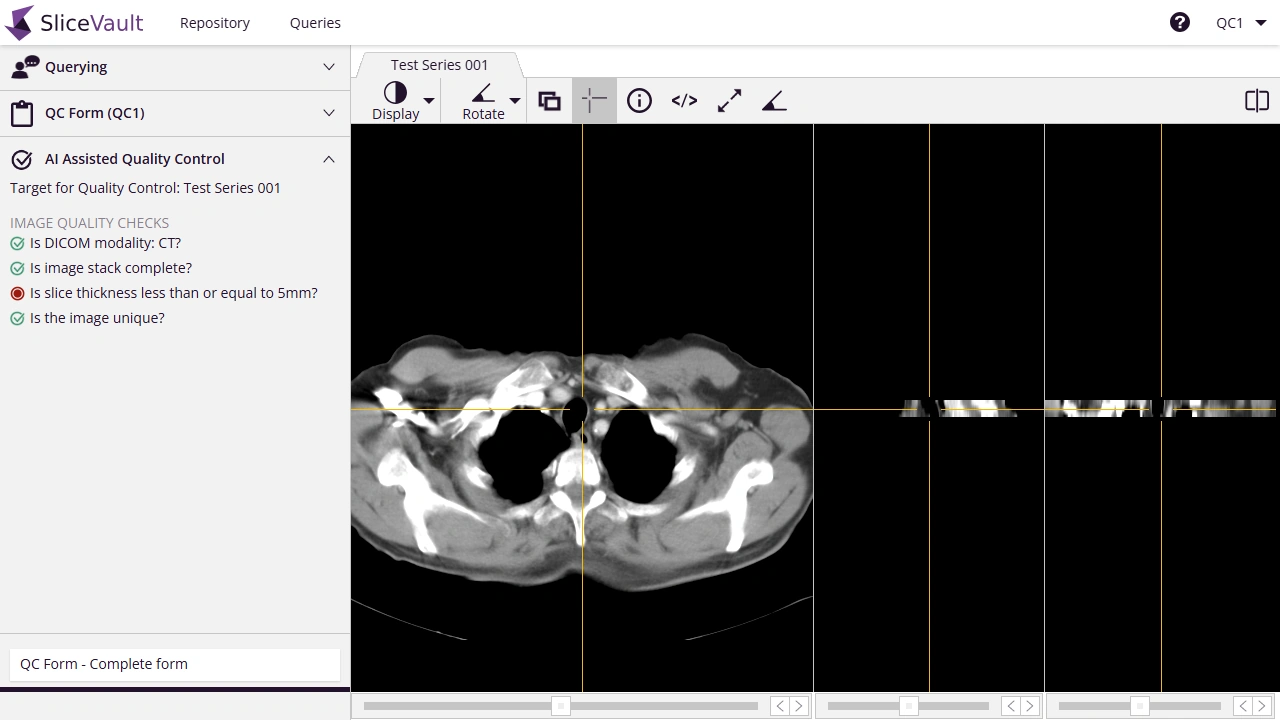
The module appears directly in the DICOM Viewer, typically in the left-hand panel next to the image review workflow.
What It Can Check
The exact checks depend on the study configuration. Common examples include:
- contrast use
- expected phase of IV contrast
- oral contrast detection
- expected anatomy coverage
- same-subject verification for follow-up studies
- duplicate study detection
- modality verification
- slice thickness consistency
- missing slices