Download Data
You can view and download data directly from the Visit Dashboard. You can download the entire visit or individual images depending on your needs after approval by a Quality Control Manager.
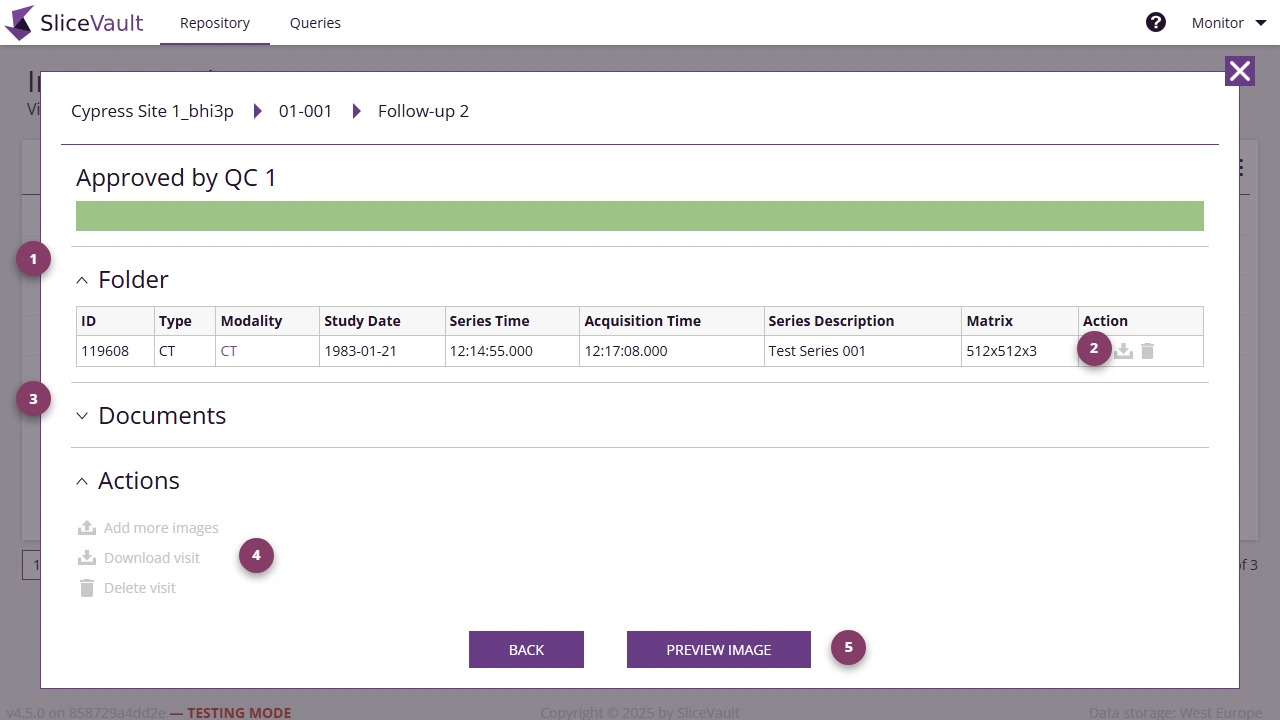
- Use 1 to review uploaded image series in the Folder section.
- Use 2 to use individual image-level actions, including file download.
- Use 3 to review generated PDFs and completed records in the Documents section.
- Use 4 to use visit-level download options in the Actions section.
- Use 5 to open Preview Image for full image and form context before downloading.
If you need to inspect the visit before downloading, see Review Forms and Documents.
If download options are missing or nothing has been generated yet, see Why are forms or downloads still unavailable?.
For repository reports and shared export concepts, see Reports and Exports.