Why Can’t a Whole Site Access the Study?
If users at a site cannot enter SliceVault even though their credentials are correct, the cause is often the site activation settings. Trial Administrators control this from the site editor.
Check the Site Status
Open the site from Manage Sites and scroll to the activation settings.
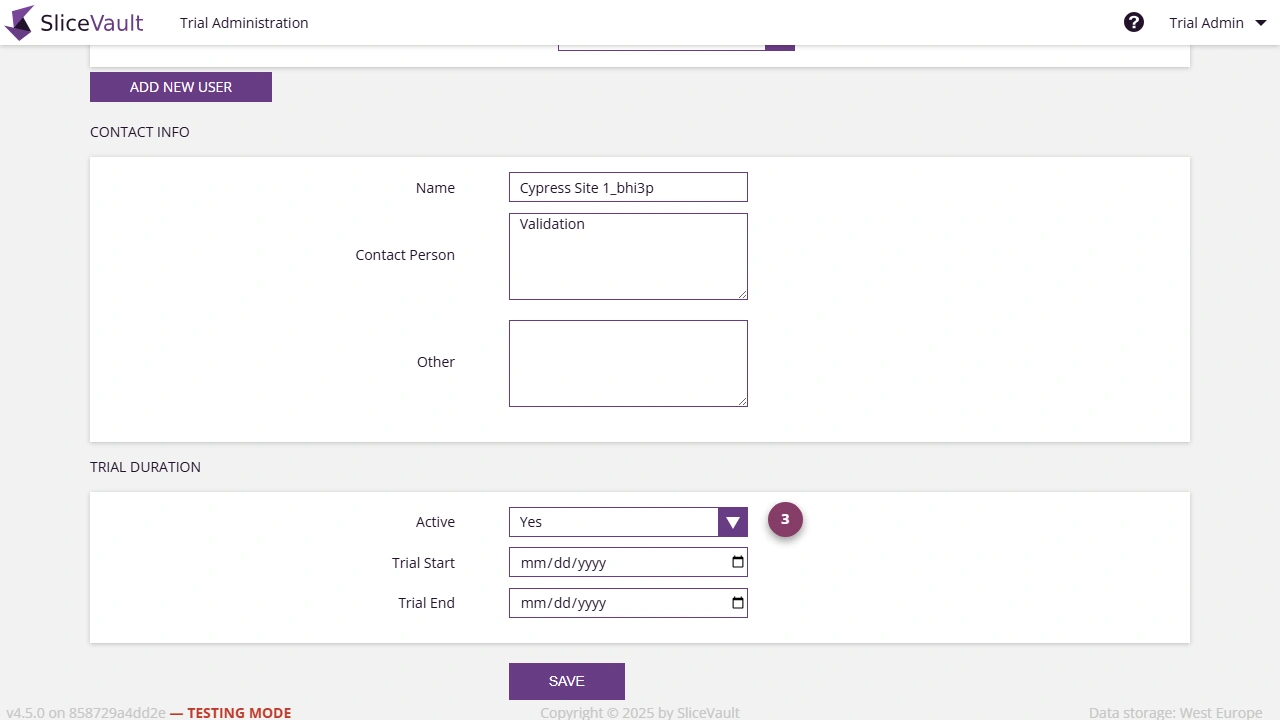
- Use 3 to confirm that the site is set to active.
A site can only be used when both of the following are true:
- the site is set to active
- the current date falls inside the configured trial start and trial end dates
Common Access Problems
The most common reasons users lose access are:
- the site was set to inactive manually
- the trial end date has already passed
- the trial dates were updated, but the site was not re-activated afterwards
If a trial end date has expired, extending the date alone may not be enough. After updating the dates, confirm that the site is also active.
When to Use This
Check site activation when:
- a whole site reports that nobody can log in
- a user disappears from repository access after a study pause
- access should be restored for a site after extending study dates
For broader site configuration, including patient ID rules and investigator access levels, see Manage Sites.