Repository Tools and Alerts
The repository does more than list patients and visits. It also gives Investigators access to trial-level tools that help you monitor open questions, attention flags, and study navigation.
Key Repository Tools
Open the repository and use the visible tools to move between daily tasks.
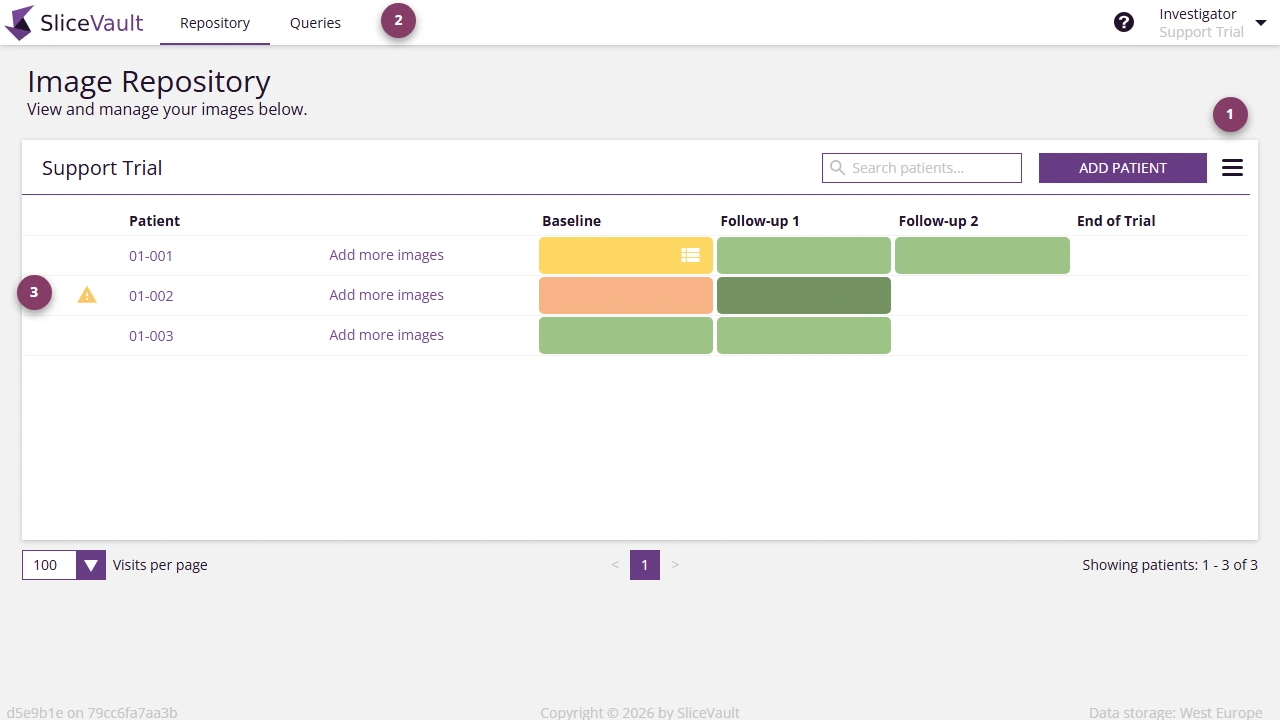
The most important repository tools are:
- the repository menu for additional study-level actions
- the query area for reviewing open query threads
- patient-level attention markers that highlight issues requiring follow-up
Query Access
If a visit has an open query, you can see this directly from the repository and then continue into the relevant query workflow. For the full reply process, see Respond to Queries.
Attention Flags
Attention indicators help you spot patients or visits that need review. Depending on the study and visit state, these can reflect workflow issues, enrollment problems, or other items that should be checked before submission.
Related Pages
- To start a new upload, see Start Upload from Repository
- To open a specific visit, see Open the Visit Dashboard
- To reply to questions from QC or Readers, see Respond to Queries